
Kia Soul (SK3): Manual climate control system / Heating and air conditioning
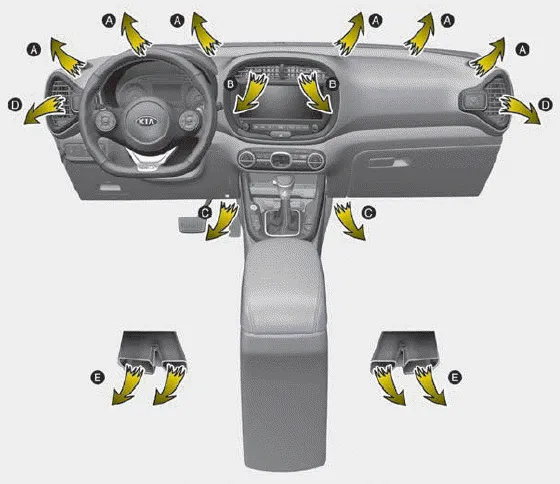
1. Start the engine.
2. Set the mode to the desired position. For improving the effectiveness of heating
and cooling; - Heating:  - Cooling:

3. Set the temperature control to the desired position.
4. Set the air intake control to the outside (fresh) air position.
5. Set the fan speed control to the desired speed.
6. If air conditioning is desired, turn the air conditioning (if equipped) system on.
- Mode selection
- Temperature control, Max A/C selection
- Air intake control
- Fan speed control
- To turn off the blowers, Air conditioning (A/C)
1. Fan speed control knob 2. Air intake control button 3. Mode selection knob 4. Rear window defroster button 5. Temperature control knob 6. Air conditioning button CAUTION Operating the blower when the ignition switch is in the ON position could cause the battery to discharge.
The mode selection knob controls the direction of the air flow through the ventilation system. Air can be directed to the floor, dashboard outlets, or windshield.
Other information:
Kia Soul (SK3) 2020-2025 Owners Manual: Vehicle weight
This section will guide you in the proper loading of your vehicle, to keep your loaded vehicle weight within its design rating capability. Properly loading your vehicle will provide maximum return of the vehicle design performance. Before loading your vehicle, familiarize yourself with the following terms for determining your vehicle's
Kia Soul (SK3) 2020-2025 Owners Manual: Changing a tire with TPMS
If you have a flat tire, the low Tire Pressure and Position telltales will come on. In this case, have the system checked by a professional workshop. Kia recommends to visit an authorized Kia dealer/service partner. CAUTION We recommend that you use the sealant approved by Kia.
Categories
- Manuals Home
- Kia Soul Owners Manual
- Safety features of your vehicle
- System setting and activation
- Driving your vehicle
- New on site
- Most important about car
