
Kia Soul (SK3): Manual climate control system / Heating and air conditioning
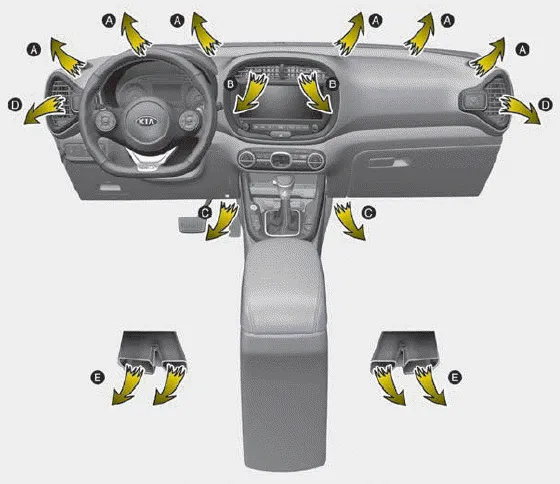
1. Start the engine.
2. Set the mode to the desired position. For improving the effectiveness of heating
and cooling; - Heating:  - Cooling:

3. Set the temperature control to the desired position.
4. Set the air intake control to the outside (fresh) air position.
5. Set the fan speed control to the desired speed.
6. If air conditioning is desired, turn the air conditioning (if equipped) system on.
- Mode selection
- Temperature control, Max A/C selection
- Air intake control
- Fan speed control
- To turn off the blowers, Air conditioning (A/C)
1. Fan speed control knob 2. Air intake control button 3. Mode selection knob 4. Rear window defroster button 5. Temperature control knob 6. Air conditioning button CAUTION Operating the blower when the ignition switch is in the ON position could cause the battery to discharge.
The mode selection knob controls the direction of the air flow through the ventilation system. Air can be directed to the floor, dashboard outlets, or windshield.
Other information:
Kia Soul (SK3) 2020-2025 Owners Manual: Check tire pressure
You can check the tire pressure in the assist mode on the cluster. - Refer to “LCD mode” on page 4-54. Tire pressure is displayed 1~2 minutes later after driving. If tire pressure is not displayed when the vehicle is stopped, “Drive to display” message displays.
Kia Soul (SK3) 2020-2025 Owners Manual: Battery recharging
Your vehicle has a maintenance-free, calcium-based battery. If the battery becomes discharged in a short time (because, for example, the headlights or interior lights were left on while the vehicle was not in use), recharge it by slow charging (trickle) for 10 hours.
Categories
- Manuals Home
- Kia Soul Owners Manual
- System setting and activation
- Safety features of your vehicle
- Drive mode integrated control system
- New on site
- Most important about car
