
Kia Soul (SK3): Heating and air conditioning / Fan speed control
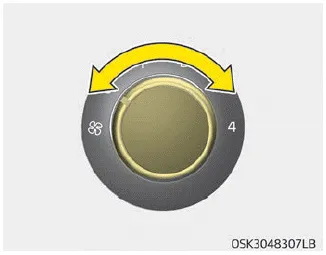
The ignition switch must be in the ON position for fan operation.
The fan speed control knob allows you to control the fan speed of the air flowing from the ventilation system. To change the fan speed, turn the knob to the right for higher speed or left for lower speed.
Setting the fan speed control knob to the “0” position turns off the fan.
The air intake control is used to select the outside (fresh) air position or recirculated air position. To change the air intake control position, press the control button.
To turn off the blowers To turn off the blowers, turn the fan speed control knob to the “0” position. Air conditioning (A/C) Press the A/C button to turn the air conditioning system on (indicator light will illuminate).
Other information:
Kia Soul (SK3) 2020-2025 Owners Manual: Side repeater lamp (Bulb type) bulb replacement
1. Remove the lamp assembly from the vehicle by prying the lens and pulling the assembly out. 2. Disconnect the bulb electrical connector. 3. Separate the socket and the lens parts by turning the socket counterclockwise until the tabs on the socket align with the slots on the lens part.
Kia Soul (SK3) 2020-2025 Owners Manual: Front fog lamp aiming
To aim the front fog lamp up or down, turn the driver clockwise or counterclockwise. Aiming point (Headlamp type A) Aiming point (Headlamp type B) Aiming point (Headlamp type C) Head lamp low beam (LHD Vehicle) 1. Turn the low beam on without driver aboard.
Categories
- Manuals Home
- Kia Soul Owners Manual
- Drive mode integrated control system
- Features of your vehicle
- What to do in an emergency
- New on site
- Most important about car
