
Kia Soul (SK3): DRIVER ATTENTION WARNING (DAW) SYSTEM / Resetting the system, System disabled
Resetting the system
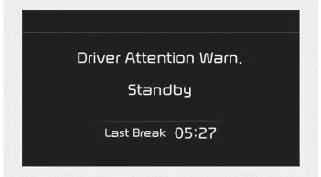
- The last break time is set to 00:00 and the driver's attention level is set to 5 (very attentive) when the driver resets Driver Attention Warning system.
- Driver Attention Warning system resets in the following situations.
- The vehicle is turned OFF.
- The driver unfastens the seat belt and then opens the driver’s door.
- Stop lasting more than 10 minutes. - Driver Attention Warning system operates again, when the driver restarts driving.
System disabled
Driver Attention Warning system enters the ready status and displays the 'Disabled' screen in the following situations.
- The camera sensor keeps failing to detect the lanes.
- Driving speed remains over 180 km/h.
System setting Driver Attention Warning system is set to be in the normal sensitivity, when your vehicle is first delivered to you from the factory.
When the "Check System" warning message appears, the system is not working properly. In this case, have the system checked by a professional workshop.
Other information:
Kia Soul (SK3) 2020-2025 Owners Manual: Emergency commodity
There are some emergency commodities in the vehicle to help you respond to the emergency situation. Fire extinguisher If there is small fire and you know how to use the fire extinguisher, take the following steps carefully. 1. Pull the pin at the top of the extinguisher that keeps the handle from being accidentally pressed.
Kia Soul (SK3) 2020-2025 Owners Manual: Explanation of scheduled maintenance items
Engine oil and filter The engine oil and filter should be changed at the intervals specified in the maintenance schedule. If the car is being driven in severe conditions, more frequent oil and filter changes are required. Drive belts Inspect all drive belts for evidence of cuts, cracks, excessive wear or oil saturation and replace if neces
Categories
- Manuals Home
- Kia Soul Owners Manual
- Features of your vehicle
- Trip information (trip computer)
- Drive mode integrated control system
- New on site
- Most important about car
