
Kia Soul (SK3): Features of your vehicle / Head Up Display (HUD). Head Up Display Information & Setting
Description
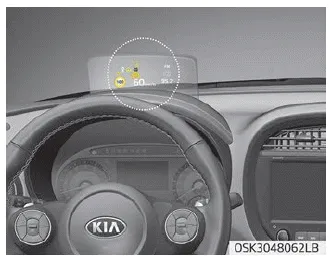
The head up display is a transparent display which projects a shadow of some information of the instrument cluster and navigation on the HUD screen.
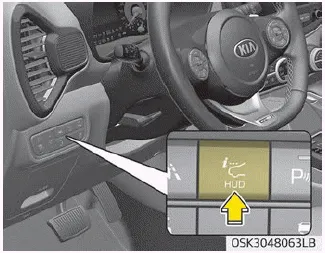
• Head-up display screen operation
The hidden screen will go up when you press the screen operation switch on the left side of the lower part of crash pad and if you press the switch again, the screen will return to its original hidden position.
- The head-up display closes automatically when the door is locked with the smart key in the vehicle OFF state.
- For smart key vehicles, the lock / unlock button on the outside handle of the front door automatically closes the head-up display when the door is locked.
- If you do not lock the door in the vehicle OFF state, the head-up display closes automatically after about 5 minutes.
- The head up display image on the HUD screen may be invisible when:
- Sitting posture is bad.
- Wearing a polarized sunglasses.
- There is an object on the cover of the head up display.
- Driving on a wet road.
- An inadequate lighting is turned on inside the vehicle.
- Any light comes from the outside.
- Wearing an inadequate glasses to your eyesight. - If the head up display image is not shown well, adjust the height, rotation or illumination of the head up display in the cluster.
- When the head up display needs inspection or repair, Kia recommends to visit an authorized Kia dealer/service partner.
WARNING
Head Up Display
- Do not attach stickers or accessories to the head-up display and the crash pad.
- Do not manually adjust the shutter and combiner. The images may not be visible due to fingerprints. Excessive external force during operation may cause damage.
- Do not place any objects near the head-up display. Interference with the object during operation may damage it.
- Do not place any objects around the head-up display. It might enter the narrow gap of the cover and affects operation.
- Do not place any liquids around the head-up display. Water or other liquids can break when it flows into the head-up display.
- Do not expose the combiner to strong light. The combiner may be deformed.
- Do not use organic solvents, detergents or abrasive cloths to clean the head-up display. Wipe it off with a soft cloth. Do not strongly wipe head-up display shutter. it might be damaged.
- For safety, be sure to adjust the settings when vehicle stopped.
- When opening, closing and height adjusting the head-up display, noise may be generated by the motor and gear.
- Do no place any accessories on the Head Up Display shutter. It might fall into Head Up Display and can damage to Head Up Display.
- As the Blind-spot Collision Warning (BCW) system is a supplemental device for your safe driving, it may be dangerous to rely on only the BCW information of the head up display image when changing the lane. Always pay attention to drive safely.
Head Up Display Information & Setting
Head Up Display Information
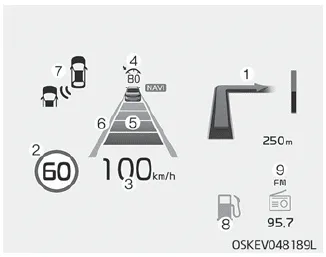
1. Turn By Turn navigation information
2. Road signs
3. Speedometer
4. Cruise setting speed
5. Smart Cruise Control (SCC) information
6. Lane Keeping Assist information
7. Blind-spot Collision Warning information
8. Warning lights (Low fuel)
9. AV mode information
Head up Display Setting
On the LCD display, you can change the head up display settings as follows.
1. Display height
2. Rotation
3. Brightness
4. Content selection
5. Speedometer size
6. Speedometer color
ECO mode indicator light This indicator light illuminates: • When you select “ECO” mode as drive mode. SPORT mode indicator light This indicator light illuminates: • When you select “SPORT” mode as drive mode.
Reverse Parking Distance Warning system assists the driver during backward movement of the vehicle by chiming if any object is sensed within a distance of 120 cm (47 in.
Other information:
Kia Soul (SK3) 2020-2025 Owners Manual: Engine oil (Gasoline)
Checking the engine oil level 1. Be sure the vehicle is on level ground. 2. Start the engine and allow it to reach normal operating temperature. WARNING Radiator hose Be very careful not to touch the radiator hose when checking or adding the engine oil as it may be hot enough to burn you.
Kia Soul (SK3) 2020-2025 Owners Manual: Fuses
❈ Left side : Normal, Right side : Blown A vehicle’s electrical system is protected from electrical overload damage by fuses. This vehicle has 2 (or 3) fuse panels, one located in the driver’s side panel bolster, the others in the engine compartment near the battery.
Categories
- Manuals Home
- Kia Soul Owners Manual
- Trip information (trip computer)
- Specifications & Consumer information
- Changing tires
- New on site
- Most important about car
