
Kia Soul (SK3): Smart Cruise Control (SCC) system / Smart Cruise Control switch
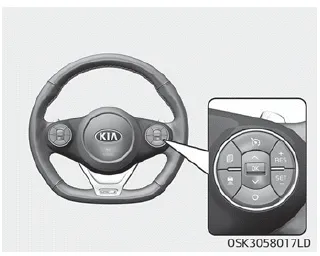
CRUISE: Turns cruise control system on or off.
RES+ : Resumes or increases cruise control speed.
SET- : Sets or decreases cruise control speed.
 : Sets vehicle-to-vehicle distance.
CANCEL: Cancels cruise control operation.
1. Cruise indicator 2. Set speed 3. Vehicle-to-vehicle distance To see SCC screen on the LCD display on the cluster, select Assist mode (). For more informations, refer to “LCD display” on page 4-51.
To set smart cruise control speed: 1. Press the CRUISE button, to turn the system on. The CRUISE indicator in the instrument cluster will illuminate.
Other information:
Kia Soul (SK3) 2020-2025 Owners Manual: Side repeater lamp (Bulb type) bulb replacement
1. Remove the lamp assembly from the vehicle by prying the lens and pulling the assembly out. 2. Disconnect the bulb electrical connector. 3. Separate the socket and the lens parts by turning the socket counterclockwise until the tabs on the socket align with the slots on the lens part.
Kia Soul (SK3) 2020-2025 Owners Manual: Room lamp (Bulb type) bulb replacement
WARNING Prior to working on the Interior lamps, ensure that the “OFF” button is depressed to avoid burning your fingers or receiving an electric shock. 1. Using a flat-blade screwdriver, gently pry the lens cover from lamp housing. 2. Remove the bulb by pulling it straight out.
Categories
- Manuals Home
- Kia Soul Owners Manual
- Safety features of your vehicle
- Battery replacement
- Drive mode integrated control system
- New on site
- Most important about car
