
Kia Soul (SK3): Door locks / Operating door locks from inside the vehicle. With central door lock switch
With the door lock button
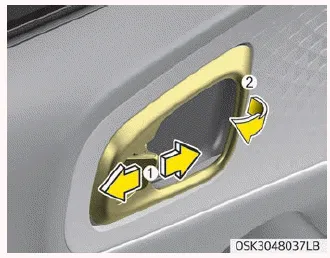
- To unlock a door, push the door lock button (1) to the “Unlock” position. The red mark on the handle will be visible.
- To lock a door, push the door lock button (1) to the “Lock” position. If the door is locked properly, the red mark on the door handle will not be visible.
- To open a door, pull the door handle (2) outward.
- If the inner door handle of the driver’s (or front passenger’s) door is pulled when the door lock button is in the lock position, the button will unlock and the door will open. (if equipped)
- Front doors cannot be locked if the ignition key is in the ignition switch and any front door is opened.
- Doors cannot be locked if the smart key is in the vehicle and an door is open.
WARNING
Door lock malfunction
If a power door lock ever fails to function while you are in the vehicle, try one or more of the following techniques to exit:
- Operate the door unlock feature repeatedly (both electronic and manual) while simultaneously pulling on the door handle.
- Operate the other door locks and handles, front and rear.
- Lower a front window and use the key to unlock the door from outside.
- Move to the cargo area and open the tailgate.
WARNING
Do not pull the inner door handle of driver’s (or passenger’s) door while the vehicle is moving.
With central door lock switch
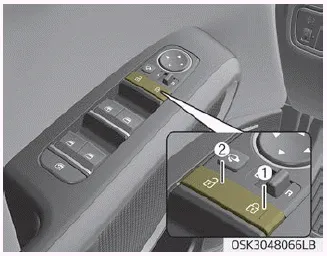
Operate by pressing the central door lock switch.
- When pressing the right portion (1) for driver side of the switch, all vehicle doors will lock.
- When pressing the left portion (2) for driver side of the switch, all vehicle doors will unlock.
- If the key is in the ignition switch (or if the smart key is in the vehicle) and any door is opened, the doors will not lock even though the right portion(1) for driver side of the central door lock switch is pressed.
WARNING
Doors
- The doors should always be fully closed and locked while the vehicle is in motion to prevent accidental opening of the door. Locked doors will also discourage potential intruders when the vehicle stops or slows down.
- Be careful when opening doors and watch for vehicles, motorcycles, bicycles or pedestrians approaching the vehicle in the path of the door. Opening a door when something is approaching can cause damage or injury.
WARNING
Unlocked vehicles
Leaving your vehicle unlocked can invite theft or possible harm to you or others from someone hiding in your vehicle while you are gone. Always remove the ignition key, engage the parking brake, close all windows and lock all doors when leaving your vehicle unattended.
WARNING
Unattended children
An enclosed vehicle can become extremely hot, causing death or severe injury to unattended children or animals who cannot escape the vehicle. Furthermore, children might operate features of the vehicle that could injure them, or they could encounter other harm, possibly from someone gaining entry to the vehicle. Never leave children or animals unattended in your vehicle.
To remove the cover : 1. Pull out the door handle. 2. Press the lever (1) located inside the bottom part of the cover with a key or flat-head screwdriver.
Impact sensing door unlock system (if equipped) All doors will automatically unlock when an impact causes the air bags to deploy. Speed sensing door lock system (if equipped) All doors will automatically lock after the vehicle speed exceeds 15 km/h.
Other information:
Kia Soul (SK3) 2020-2025 Owners Manual: In case of an emergency while driving
If the engine stalls at a crossroad or crossing If the engine stalls at a crossroad or crossing, set the shift lever in the N (Neutral) position and then push the vehicle to a safe place. If your vehicle has a manual transaxle not equipped with a ignition lock switch, the vehicle can move forward by shifting to the 2(Second) or 3(Third)
Kia Soul (SK3) 2020-2025 Owners Manual: Low aspect ratio tire
Low aspect ratio tires, whose aspect ratio is lower than 50, are provided for sporty looks. Because the low aspect ratio tires are optimized for handling and braking, it may be more uncomfortable to ride in and there is more noise compare with normal tires.
Categories
- Manuals Home
- Kia Soul Owners Manual
- Trip information (trip computer)
- Rear seat adjustment
- Your vehicle at a glance
- New on site
- Most important about car
