
Kia Soul (SK3): Interior features / USB charger
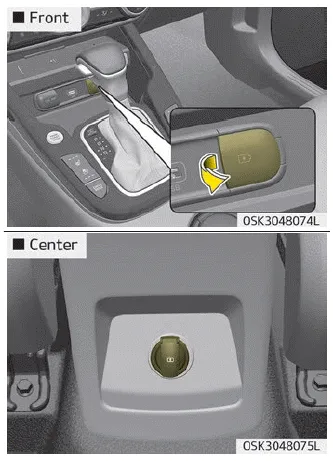
The USB car charger allows drivers to charge their digital devices like smartphone, and PC tablets. Connect the cable to the USB port, charging will begin.
The USB car charger is available with either the ACC state or the ignition on. But we recommend you to connect the USB port and digital devices with the engine starting. See the display screen of the device to check its charging process completion. Your smartphone or table PC could get heated up while charging. This is no reason to worry, as it doesn’t impact life or functions of the device. For the safety reason, charging can be stopped if the battery gets heated up to a certain point of temperature that the devices can be negatively affected. Charging some digital devices is not available or requires special dedicated adapters if their charging methods don’t fit the way the USB car charger works. Quick Charge 2.0 is available on the smartphone or the table PC equipped with fast charging capabilities. The applicable is as follows: (https://www.qualcomm.com/documents/ quick-charge-device-list) The smartphone or PC tablet without fast charging is charged at a regular speed.
Rated output:
Digital devices with fast charging : - 9.0 V, 1.67 A
Digital devices with normal charging : - 5.0 V, 2.1 A
CAUTION
- Used the USB car charger with the ignition on. Otherwise, Vehicle battery
can be discharged.
- Use the official USB cable of the manufacturer of the digital device to be charged.
- Make sure that any foreign object, drinks, and water do not come into contact
with the USB car charger. Water or foreign object can damage the USB charger.
- Do not use the device those current consumption exceeds 2.1A.
- Do not connect an electrical device that generates excessive electromagnetic noise
to the USB car port. If you do so, noise can be caused or vehicle electronic devices
can be interrupted while audio or AV is on.
- If the charger is connected incorrectly, it can cause serious damage on the devices.
Please note that damages due to incorrect usage are not covered by warranty service.
The power outlet is designed to provide power for mobile telephones or other devices designed to operate with vehicle electrical systems. The devices should draw less than 10 amps with the engine running.
A wireless smart phone charging system located in front of the center console. Firmly close all doors, and turn the ignition to ACC or IGN ON. To start wireless charging, place the smart phone equipped with wireless charging function on the wireless charging pad.
Other information:
Kia Soul (SK3) 2020-2025 Owners Manual: Winter driving
More severe weather conditions of winter result in greater wear and other problems. To minimize winter driving problem, you should follow these suggestions: ❈ Snow tires and tire chains for the national language (Icelandic, Bulgarian) see Chapter 10, Appendix.
Kia Soul (SK3) 2020-2025 Owners Manual: Wiper blades. Blade replacement
Blade inspection NOTICE Commercial hot waxes applied by automatic car washes have been known to make the windshield difficult to clean. Contamination of either the windshield or the wiper blades with foreign matter can reduce the effectiveness of the windshield wipers.
Categories
- Manuals Home
- Kia Soul Owners Manual
- Mirrors. Outside rearview mirror. Folding the outside rearview mirror
- What to do in an emergency
- System setting and activation
- New on site
- Most important about car
